检测堆栈集中的非托管配置更改
即使在您通过 CloudFormation 管理堆栈及其包含的资源时,用户也可以在 CloudFormation 外部更改这些资源。用户可以使用创建资源的底层服务直接编辑资源。通过对堆栈集执行偏差检测,您可以确定属于该堆栈集的任何堆栈实例是否与它们的预期配置不同或已偏离。
CloudFormation 如何对堆栈集执行偏差检测
在 CloudFormation 对堆栈集执行偏差检测时,它对与堆栈集中的每个堆栈实例关联的堆栈执行偏差检测。为此,CloudFormation 将堆栈中的每个资源的当前状态与该资源的预期状态进行比较,该状态是堆栈的模板以及任何指定的输入参数中定义的。如果资源的当前状态不同于预期状态,则认为该资源已偏离。如果堆栈中的一个或多个资源已偏离,则将堆栈本身视为已偏离,并将与堆栈关联的堆栈实例也视为已偏离。如果堆栈集中的一个或多个堆栈实例已偏离,则将堆栈集本身视为已偏离。
偏差检测确定非托管更改;即,在 CloudFormation 外部对堆栈进行的更改。直接通过 CloudFormation 对堆栈进行的更改(而不是在堆栈集级别)不会被视为偏差。例如,假设您具有一个与堆栈集的堆栈实例关联的堆栈。如果您使用 CloudFormation 更新该堆栈以使用不同的模板,则不会将其视为偏差,即使该堆栈现在具有与属于堆栈集的任何其他堆栈不同的模板。这是因为,该堆栈仍与它在 CloudFormation 中的预期模板和参数配置匹配。
有关 CloudFormation 如何对堆栈执行偏差检测的详细信息,请参阅检测堆栈和资源的非托管配置更改。
由于分别 CloudFormation 对每个堆栈执行偏差检测,因此,它在确定堆栈是否偏离时考虑任何覆盖的参数值。有关在堆栈实例中覆盖模板参数的更多信息,请参阅覆盖堆栈实例上的参数。
如果直接对与堆栈实例关联的堆栈执行偏差检测,则无法在 StackSets 控制台页面中查看这些偏差结果。
使用 Amazon Web Services Management Console检测堆栈集上的偏差
打开 Amazon CloudFormation 控制台,地址:https://console.aws.amazon.com/cloudformation
。 -
在 StackSets (堆栈集) 页面上,选择要执行偏差检测的堆栈集。
从 Actions (操作) 菜单中,选择 Detect drifts (检测偏差)。
CloudFormation 将显示一个信息栏,以指示为选定的堆栈集启动了偏差检测。
可选:要监控偏差检测操作进度,请执行以下操作:
选择堆栈集名称以显示 Stackset details (堆栈集详细信息) 页面。
选择 Operations (操作) 选项卡,选择偏差检测操作,然后选择 View drift details (查看偏差详细信息)。
CloudFormation 显示 Operation details (操作详细信息) 对话框。
请耐心等待,直到 CloudFormation 完成偏差检测操作。在偏差检测操作完成时,CloudFormation 将更新堆栈集的 Drift status (偏差状态) 和 Last drift check time (上次偏差检查时间)。这些字段在选定堆栈集的 StackSet details(堆栈集详细信息)页面的 Overview(概述)选项卡上列出。
偏差检测操作可能需要一些时间,具体取决于堆栈集中包含的堆栈实例数量以及堆栈集中包含的资源数量。您一次只能在给定堆栈集上运行一个偏差检测操作。即使您关闭信息栏,CloudFormation 也会继续执行偏差检测操作。
-
要查看堆栈集中的堆栈实例的偏差检测结果,请选择 Stack instances (堆栈实例) 选项卡。
Stack name (堆栈名称) 列列出与每个堆栈实例关联的堆栈的名称,Drift status (偏差状态) 列列出该堆栈的偏差状态。如果堆栈的一个或多个资源已偏离,则认为堆栈已偏离。
-
要查看与特定堆栈实例关联的堆栈的偏差检测结果,请执行以下操作:
记下堆栈实例的 Amazon 账户、堆栈名称和Amazon 区域。
打开 Amazon CloudFormation 控制台,地址:https://console.aws.amazon.com/cloudformation
。 登录到包含堆栈实例的 Amazon 账户。
选择包含堆栈实例的 Amazon 区域。
从左侧导航窗格中,选择 Stacks (堆栈)。
选择您要查看的堆栈,然后选择 Drifts (偏差)。
CloudFormation 将显示与指定堆栈实例关联的堆栈的 Drifts (偏差) 页面。
在 Resource drift details (资源偏差状态) 部分中,CloudFormation 会列出每个堆栈资源、其偏差状态,以及最后一次在资源上启动偏差检测的时间。将会显示每个资源的逻辑 ID 和物理 ID,以帮助您识别它们。此外,对于状态为 MODIFIED (已修改) 的资源,CloudFormation 会显示资源偏差详细信息。
您可以使用偏差状态列根据资源偏差状态对资源排序。
查看已修改资源的详细信息。
-
选定已修改的资源,选择 View drift details(查看偏差详细信息)。
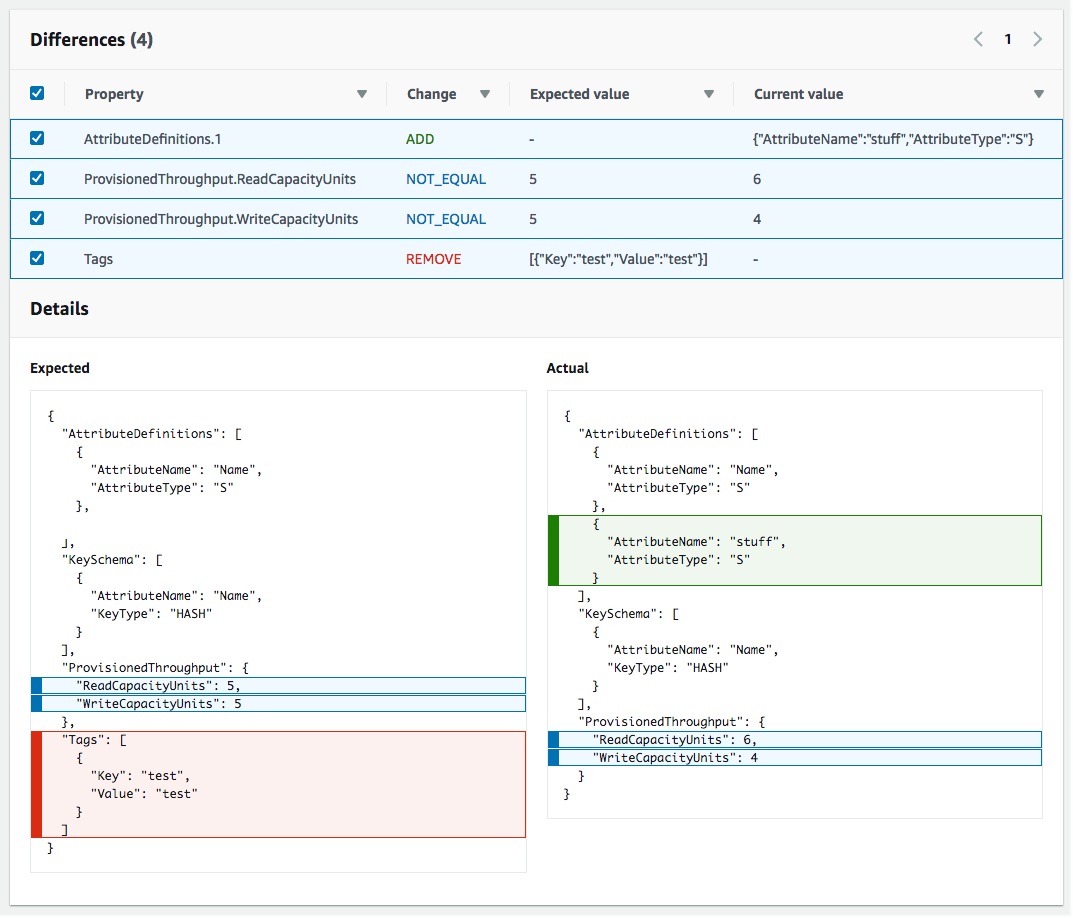
CloudFormation 会显示该资源的偏差详细信息页面。此页面会列出资源的预期和当前属性值,以及两者之间的任何区别。
要突出显示区别,请在区别部分中选择属性名称。
添加的属性在 Details(详细信息)部分的 Current(当前)列中以绿色突出显示。
删除的属性在 Details(详细信息)部分的 Expected(预期)列中以红色突出显示。
其值已更改的属性在 Expected (预期) 和 Current (当前) 列中以蓝色突出显示。
-
使用 Amazon CLI检测堆栈集上的偏差
要使用 Amazon CLI 在整个堆栈上检测偏差,请使用以下 aws cloudformation 命令:
detect-stack-set-drift,用于对堆栈启动偏差检测操作。describe-stack-set-operation,用于监控堆栈偏差检测操作的状态。在偏差检测操作完成后,可以使用以下命令返回所需的偏差信息:
使用
describe-stack-set返回有关堆栈集的详细信息,包括有关堆栈集的上次完成 的偏差操作的详细信息。(不包括有关正在执行的偏差操作的信息。)使用
list-stackinstances返回属于堆栈集的堆栈实例的列表,包括每个实例的偏差状态和上次偏差检查时间。使用
describe-stack-instance返回有关特定堆栈实例的详细信息,包括其偏差状态和上次偏差检查时间。
使用
detect-stack-set-drift检测整个堆栈集及其关联堆栈实例上的偏差。以下示例对
stack-set-drift-example堆栈集启动偏差检测。aws cloudformation detect-stack-set-drift --stack-set-name stack-set-drift-example { "OperationId": "c36e44aa-3a83-411a-b503-cb611example" }由于堆栈集偏差检测操作可能是长时间运行的操作,因此,请使用
describe-stack-set-operation监控偏差操作的状态。该命令使用detect-stack-set-drift命令返回的堆栈集操作 ID。以下示例使用上一示例中的操作 ID 返回有关堆栈集偏差检测操作的信息。在此示例中,该操作仍在运行。在与该堆栈集关联的 7 个堆栈实例中,发现一个堆栈实例已偏离,两个实例正在进行同步,而其余 4 个堆栈实例仍在进行偏差检测。由于一个实例已偏离,堆栈集本身的偏差状态现在为
DRIFTED。aws cloudformation describe-stack-set-operation --stack-set-name stack-set-drift-example --operation-id c36e44aa-3a83-411a-b503-cb611example { "StackSetOperation": { "Status": "RUNNING", "AdministrationRoleARN": "arn:aws:iam::012345678910:role/AWSCloudFormationStackSetAdministrationRole", "OperationPreferences": { "RegionOrder": [] }, "ExecutionRoleName": "AWSCloudFormationStackSetExecutionRole", "StackSetDriftDetectionDetails": { "DriftedStackInstancesCount": 1, "TotalStackInstancesCount": 7, "LastDriftCheckTimestamp": "2019-12-04T20:34:28.543Z", "InSyncStackInstancesCount": 2, "InProgressStackInstancesCount": 4, "DriftStatus": "DRIFTED", "FailedStackInstancesCount": 0 }, "Action": "DETECT_DRIFT", "CreationTimestamp": "2019-12-04T20:33:13.673Z", "StackSetId": "stack-set-drift-example:bd1f4017-d4f9-432e-a73f-8c22example", "OperationId": "c36e44aa-3a83-411a-b503-cb611example" } }该示例稍后执行相同的命令,以显示在偏差检测操作完成后返回的信息。在与该堆栈集关联的总共 7 个堆栈实例中,有两个实例已偏离,从而使堆栈集本身的偏差状态显示为
DRIFTED。aws cloudformation describe-stack-set-operation --stack-set-name stack-set-drift-example --operation-id c36e44aa-3a83-411a-b503-cb611example { "StackSetOperation": { "Status": "SUCCEEDED", "AdministrationRoleARN": "arn:aws:iam::012345678910:role/AWSCloudFormationStackSetAdministrationRole", "OperationPreferences": { "RegionOrder": [] } "ExecutionRoleName": "AWSCloudFormationStackSetExecutionRole", "EndTimestamp": "2019-12-04T20:37:32.829Z", "StackSetDriftDetectionDetails": { "DriftedStackInstancesCount": 2, "TotalStackInstancesCount": 7, "LastDriftCheckTimestamp": "2019-12-04T20:36:55.612Z", "InSyncStackInstancesCount": 5, "InProgressStackInstancesCount": 0, "DriftStatus": "DRIFTED", "FailedStackInstancesCount": 0 }, "Action": "DETECT_DRIFT", "CreationTimestamp": "2019-12-04T20:33:13.673Z", "StackSetId": "stack-set-drift-example:bd1f4017-d4f9-432e-a73f-8c22example", "OperationId": "c36e44aa-3a83-411a-b503-cb611example" } }在堆栈集偏差检测操作完成后,请使用
describe-stack-set、list-stackinstances和describe-stack-instance命令查看结果。describe-stack-set命令包括describe-stack-set-operation命令返回的相同详细偏差信息。aws cloudformation describe-stack-set --stack-set-name stack-set-drift-example { "StackSet": { "Status": "ACTIVE", "Description": "Demonstration of drift detection on stack sets.", "Parameters": [], "Tags": [ { "Value": "Drift detection", "Key": "Feature" } ], "ExecutionRoleName": "AWSCloudFormationStackSetExecutionRole", "Capabilities": [], "AdministrationRoleARN": "arn:aws:iam::012345678910:role/AWSCloudFormationStackSetAdministrationRole", "StackSetDriftDetectionDetails": { "DriftedStackInstancesCount": 2, "TotalStackInstancesCount": 7, "LastDriftCheckTimestamp": "2019-12-04T20:36:55.612Z", "InProgressStackInstancesCount": 0, "DriftStatus": "DRIFTED", "DriftDetectionStatus": "COMPLETED", "InSyncStackInstancesCount": 5, "FailedStackInstancesCount": 0 }, "StackSetARN": "arn:aws:cloudformation:us-east-1:012345678910:stackset/stack-set-drift-example:bd1f4017-d4f9-432e-a73f-8c22example", "TemplateBody": [details omitted], "StackSetId": "stack-set-drift-example:bd1f4017-d4f9-432e-a73f-8c22ebexample", "StackSetName": "stack-set-drift-example" } }您可以使用
list-stack-instances命令返回有关与堆栈集关联的堆栈实例的摘要信息,包括每个堆栈实例的偏差状态。在该示例中,通过对示例堆栈集执行
list-stack-instances,我们可以确定哪两个堆栈实例具有DRIFTED偏差状态。aws cloudformation list-stack-instances --stack-set-name stack-set-drift-example { "Summaries": [ { "StackId": "arn:aws:cloudformation:ap-northeast-1:012345678910:stack/StackSet-stack-set-drift-example-29168cdd-e587-4709-8a1f-90f752ec65e1/1a8a98f0-16d4-11ea-9844-060a5example", "Status": "CURRENT", "Account": "012345678910", "Region": "ap-northeast-1", "LastDriftCheckTimestamp": "2019-12-04T20:36:18.481Z", "DriftStatus": "IN_SYNC", "StackSetId": "stack-set-drift-example:bd1f4017-d4f9-432e-a73f-8c22eexample" }, { "StackId": "arn:aws:cloudformation:eu-west-1:012345678910:stack/StackSet-stack-set-drift-example-b0fb6083-60c0-4e39-af15-2f071e0db90c/0e4f0940-16d4-11ea-93d8-0641cexample", "Status": "CURRENT", "Account": "012345678910", "Region": "eu-west-1", "LastDriftCheckTimestamp": "2019-12-04T20:37:32.687Z", "DriftStatus": "DRIFTED", "StackSetId": "stack-set-drift-example:bd1f4017-d4f9-432e-a73f-8c22eexample }, { "StackId": "arn:aws:cloudformation:us-east-1:012345678910:stack/StackSet-stack-set-drift-example-b7fde68e-e541-44c2-b33d-ef2e2988071a/008e6030-16d4-11ea-8090-12f89example", "Status": "CURRENT", "Account": "012345678910", "Region": "us-east-1", "LastDriftCheckTimestamp": "2019-12-04T20:34:28.275Z", "DriftStatus": "DRIFTED", "StackSetId": "stack-set-drift-example:bd1f4017-d4f9-432e-a73f-8c22eexample" }, [additional stack instances omitted] ] }describe-stack-instance命令也返回该信息,但仅为单个堆栈实例返回该信息,如以下示例所示。aws cloudformation describe-stack-instance --stack-set-name stack-set-drift-example --stack-instance-account 012345678910 --stack-instance-region us-east-1 { "StackInstance": { "StackId": "arn:aws:cloudformation:us-east-1:012345678910:stack/StackSet-stack-set-drift-example-b7fde68e-e541-44c2-b33d-ef2e2988071a/008e6030-16d4-11ea-8090-12f89example", "Status": "CURRENT", "Account": "012345678910", "Region": "us-east-1", "ParameterOverrides": [], "DriftStatus": "DRIFTED", "LastDriftCheckTimestamp": "2019-12-04T20:34:28.275Z", "StackSetId": "stack-set-drift-example:bd1f4017-d4f9-432e-a73f-8c22eexample" } }-
在确定哪些堆栈实例已偏离后,您可以使用有关
list-stack-instances或describe-stack-instance命令返回的堆栈实例的信息以执行 describe-stack-resource-drifts。该命令返回有关堆栈中的哪些资源已偏离的详细信息。以下示例使用上面示例中的
list-stack-instances命令返回的某个偏离堆栈的堆栈 ID,来返回有关在 CloudFormation 外部修改或删除的资源的详细信息。在该堆栈中,已修改AWS::SQS::Queue资源上的两个属性(DelaySeconds和maxReceiveCount)。aws cloudformation describe-stack-resource-drifts --stack-name arn:aws:cloudformation:us-east-1:012345678910:stack/StackSet-stack-set-drift-example-b7fde68e-e541-44c2-b33d-ef2e2988071a/008e6030-16d4-11ea-8090-12f89example --stack-resource-drift-status-filters "MODIFIED" "DELETED" { "StackResourceDrifts": [ { "StackId": "arn:aws:cloudformation:us-east-1:012345678910:stack/StackSet-stack-set-drift-example-b7fde68e-e541-44c2-b33d-ef2e2988071a/008e6030-16d4-11ea-8090-12f8925a37c4", "ActualProperties": "{\"DelaySeconds\":10,\"RedrivePolicy\":{\"deadLetterTargetArn\":\"arn:aws:sqs:us-east-1:012345678910:StackSet-stack-set-drift-example-b7fde68e-e541-44c2-b33d-ef2e2-DLQ-1H0SQCOKALBDJ\",\"maxReceiveCount\":20},\"VisibilityTimeout\":60}", "ResourceType": "AWS::SQS::Queue", "Timestamp": "2019-12-04T20:33:57.261Z", "PhysicalResourceId": "https://sqs.us-east-1.amazonaws.com/012345678910/StackSet-stack-set-drift-example-b7fde68e-e541-44c2-b33d-ef2-Queue-6FNDEY4AUEPV", "StackResourceDriftStatus": "MODIFIED", "ExpectedProperties": "{\"DelaySeconds\":20,\"RedrivePolicy\":{\"deadLetterTargetArn\":\"arn:aws:sqs:us-east-1:012345678910:StackSet-stack-set-drift-example-b7fde68e-e541-44c2-b33d-ef2e2-DLQ-1H0SQCOKALBDJ\",\"maxReceiveCount\":10},\"VisibilityTimeout\":60}", "PropertyDifferences": [ { "PropertyPath": "/DelaySeconds", "ActualValue": "10", "ExpectedValue": "20", "DifferenceType": "NOT_EQUAL" }, { "PropertyPath": "/RedrivePolicy/maxReceiveCount", "ActualValue": "20", "ExpectedValue": "10", "DifferenceType": "NOT_EQUAL" } ], "LogicalResourceId": "Queue" } ] }
在堆栈集上停止偏差检测
由于对堆栈集的偏差检测可能是长时间运行的操作,因此,在某些情况下,您可能希望停止当前对堆栈集运行的偏差检测操作。
使用 Amazon Web Services Management Console停止对堆栈集的偏差检测
打开 Amazon CloudFormation 控制台,地址:https://console.aws.amazon.com/cloudformation
。 在 StackSets (堆栈集) 页面上,选择堆栈集的名称。
CloudFormation 将显示选定堆栈集的 StackSets details (堆栈集详细信息) 页面。
在 StackSets details (堆栈集详细信息) 页面上,选择 Operations (操作) 选项卡,然后选择偏差检测操作。
选择 Stop operation (停止操作)。
使用 Amazon CLI停止对堆栈集的偏差检测
使用
stop-stack-set-operation命令。您必须同时提供堆栈集名称和偏差检测堆栈集操作的操作 ID。aws cloudformation stop-stack-set-operation --stack-set-name stack-set-drift-example --operation-id 624af370-311a-11e8-b6b7-500cexample